ServiceNow: AI-First Workspaces & Navigation
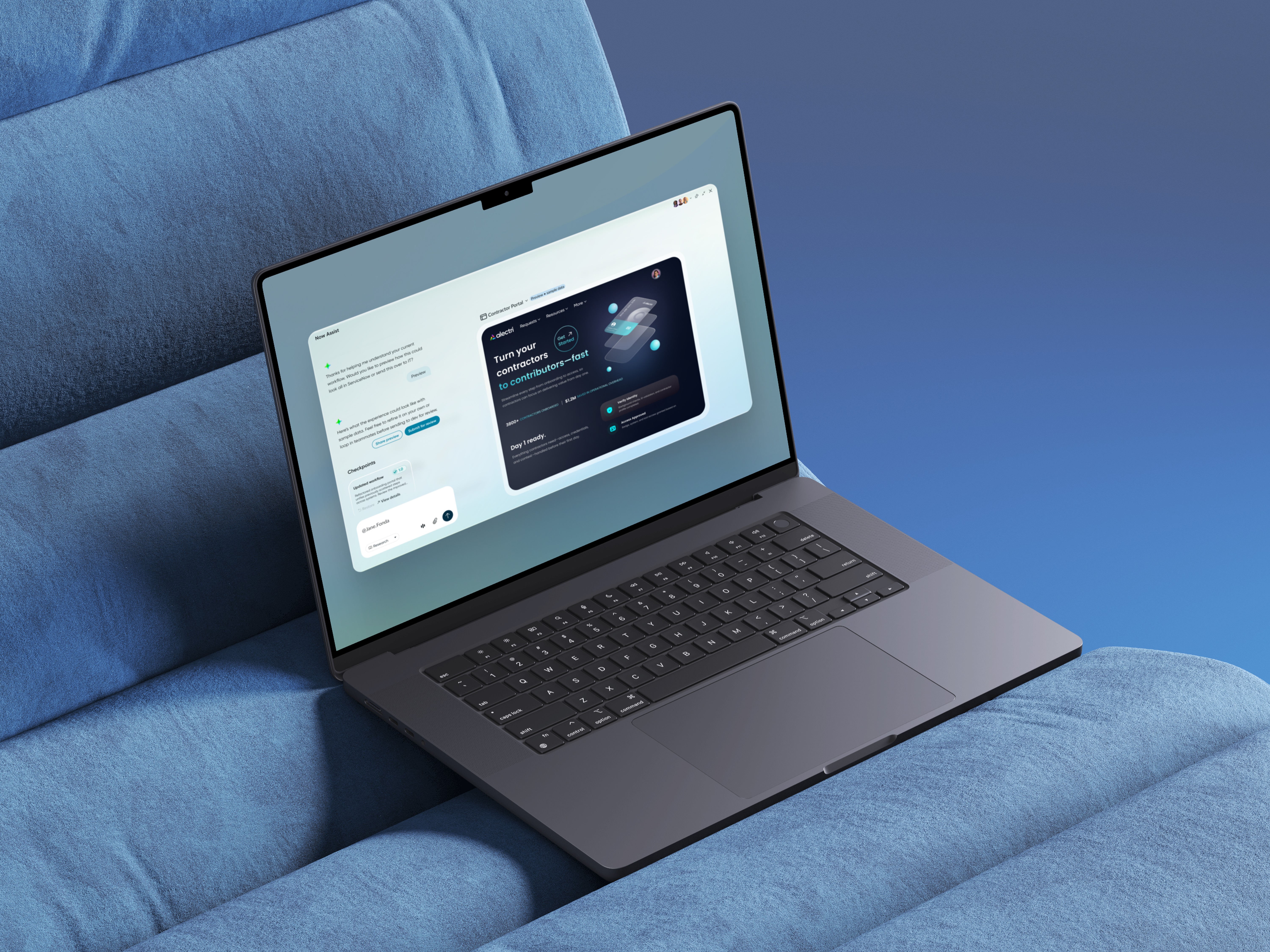
ServiceNow teams were experimenting with AI across products, but there was no shared vision for what an AI-first employee experience should actually feel like. Building on prior AI patterns research, I designed a suite of “AI OS” vision concepts that reimagined workspaces, navigation, and chat for key roles like agents, managers, and admins. These prototypes were used in Summer Strategy testing with customers and execs to shape the roadmap for ServiceNow’s AI-driven employee experience.
Overview
ServiceNow teams were experimenting with AI across multiple products, but there was no shared vision for what an AI-first employee experience should actually feel like. Building on earlier AI patterns research (visibility, trust, control, workflow fit), I designed a suite of “AI OS” vision concepts that reimagined workspaces, navigation, and chat for key roles such as agents, managers, and admins. These prototypes were used in Summer Strategy testing with customers and executives to shape the roadmap for ServiceNow’s AI-driven employee experience.
Problem
AI capabilities were emerging in pockets, but the overall experience was fragmented. Different teams were exploring their own banners, docks, chats, and AI-powered panels without a unifying model for how AI should show up day-to-day. There was no clear answer to questions like: What does an AI-first workspace look like for an agent versus a manager? How should users move between hubs, tasks, and records in an AI-aware way? When is AI a chat surface, when is it an inline assistant, and how does it relate to dashboards and forms? Without a cross-product, cross-persona vision, teams risked shipping overlapping or conflicting experiences, and leadership lacked something concrete to prioritize and fund.
Process
Grounding in AI UX principles
I started from the earlier AI patterns research and distilled a set of working principles to guide every concept: make AI visible without becoming noise, explain AI suggestions in context so users understand the “why,” keep human control non-negotiable (approve, reject, edit), and embed AI into real workflows instead of treating it as a bolt-on chatbot. These principles acted as a checklist for every workspace, navigation pattern, and chat interaction I designed.Designing role-specific workspaces
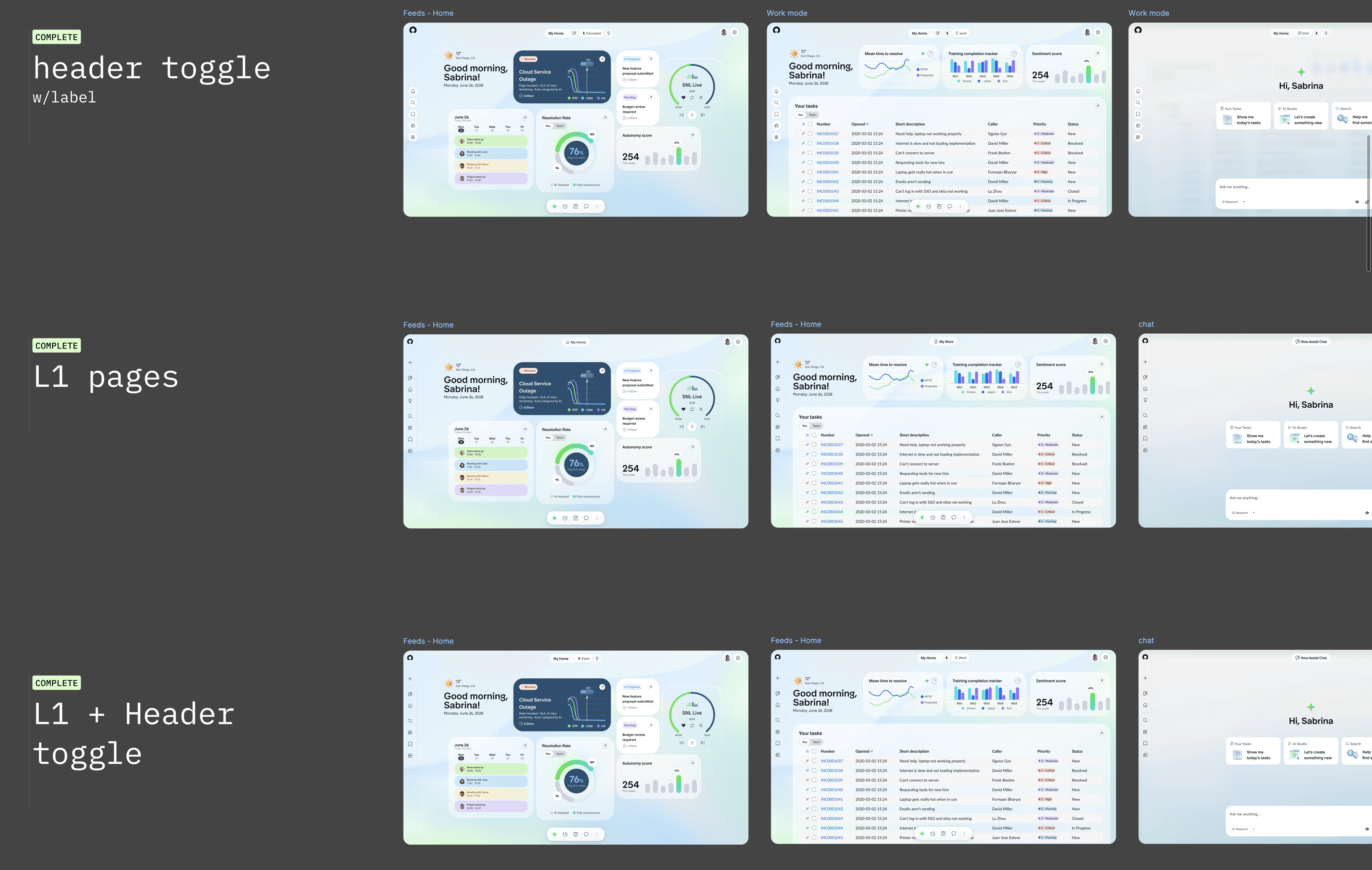
I created AI-first workspaces for key personas, including the CIWF Agent Workspace, IT Manager hubs, Service Owner Workspace, Portal Admin, and dedicated Tasks and Search views. For agents, I designed a morning “home” screen that summarized today’s work, automation coverage, sentiment trends, and escalations so they could see what truly needed their attention. For managers, I focused on MTTR, training completion, sentiment, recommendations, and other system-level signals, balancing status, trends, and “next best actions.” For service owners and admins, I explored feeds, home modes, and work modes that showed high-level signals and then let users drop into lists, bulk actions, and detailed views. Across all of these, I kept the visual and interaction language consistent so that what changed per persona was the content and hierarchy, not the underlying patterns.Defining navigation and information architecture
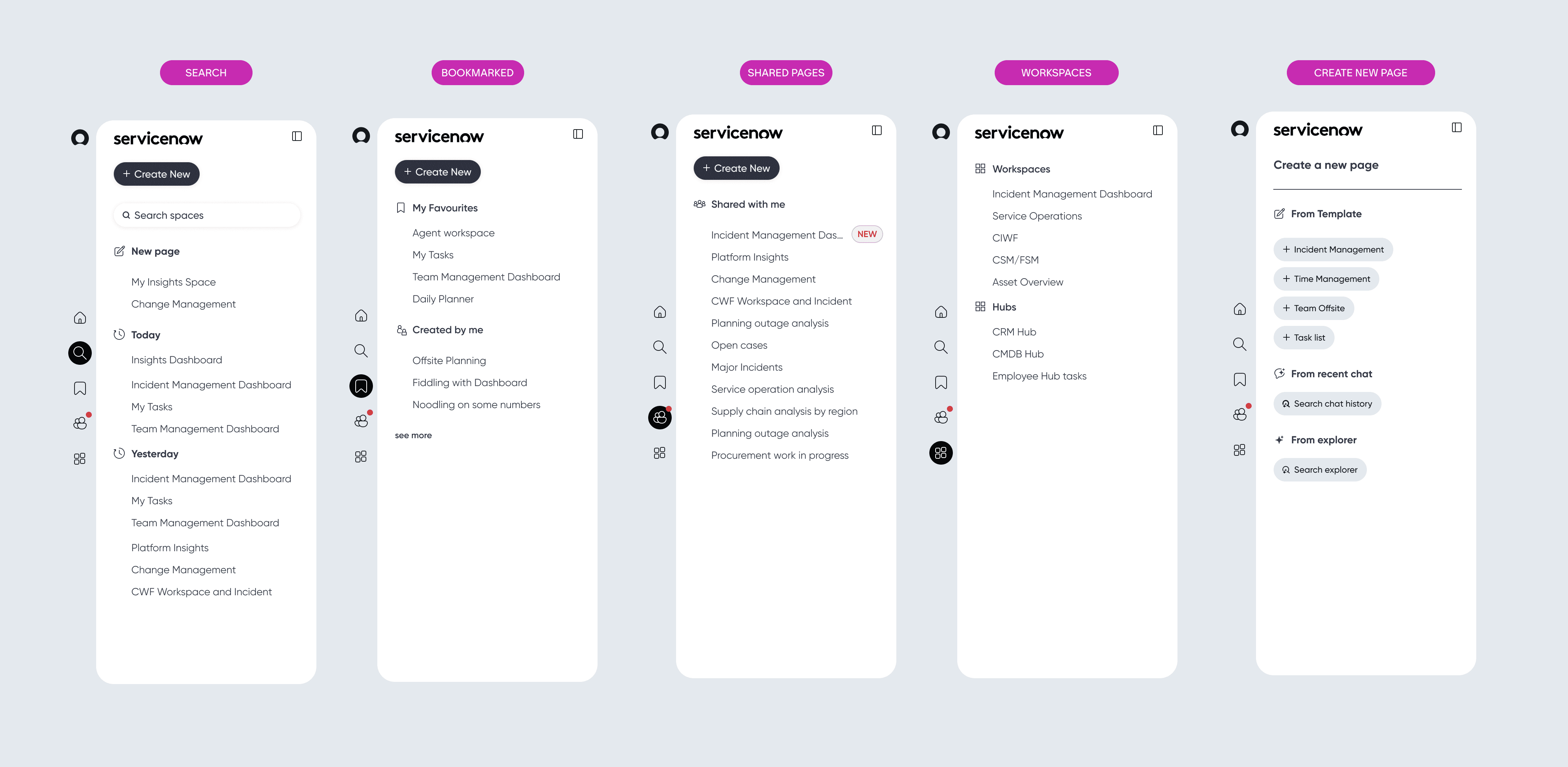
In a separate “AI IOS V3” Figma file, I worked through the navigation and IA model that would tie everything together. I explored an L1 vertical rail with direct access to key spaces such as Home, Search, Work, Chat, and Workspaces, and expanded states that revealed labels, sections, and categories. I defined flows for creating new pages from templates, recent chats, or explorer-like views, as well as patterns for search results, favourites, shared pages, and shared workspaces. I laid out these states side by side so we could evaluate clarity, density, and how quickly users could orient themselves when moving between hubs, workspaces, and records.Building chat and toolbar interaction patterns
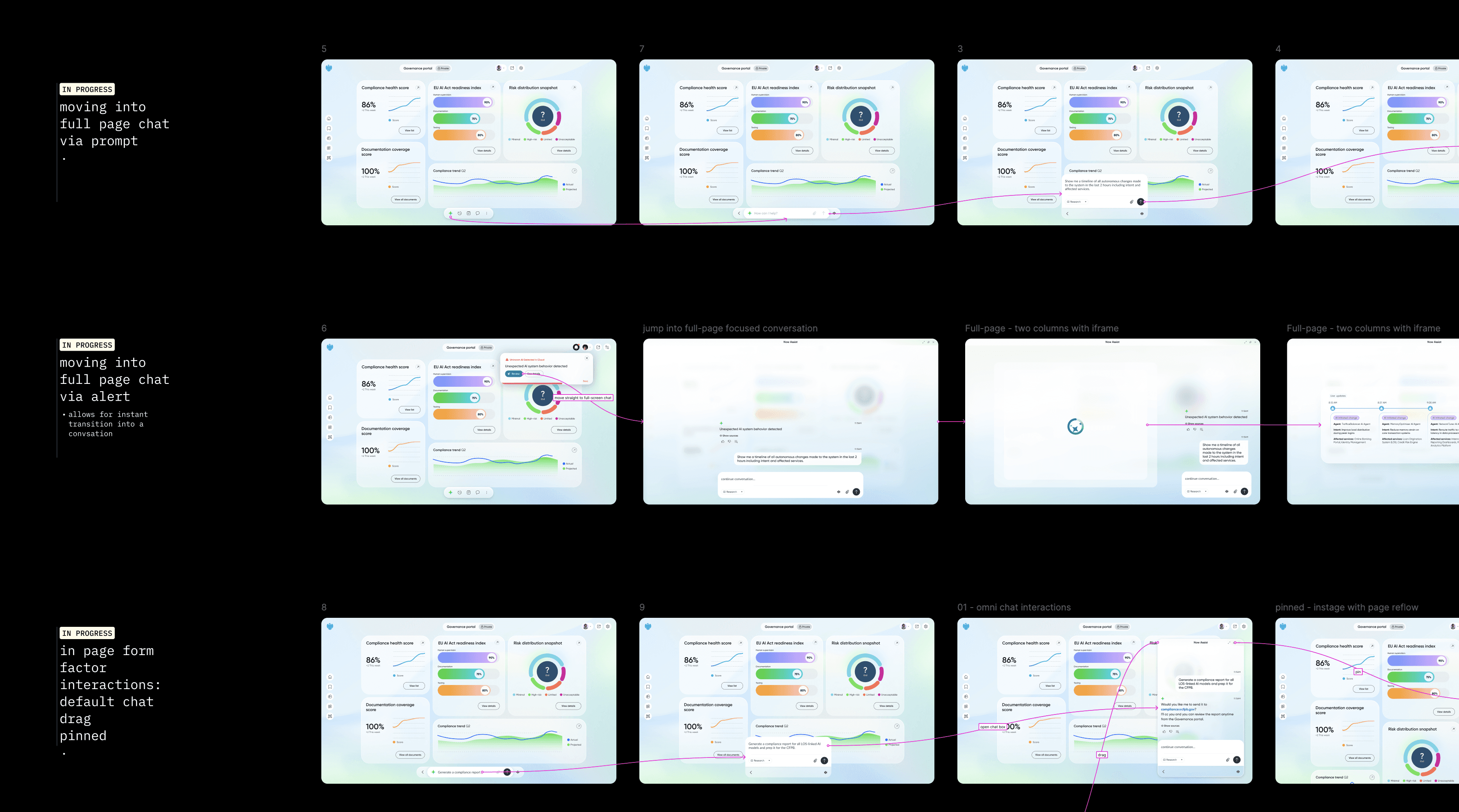
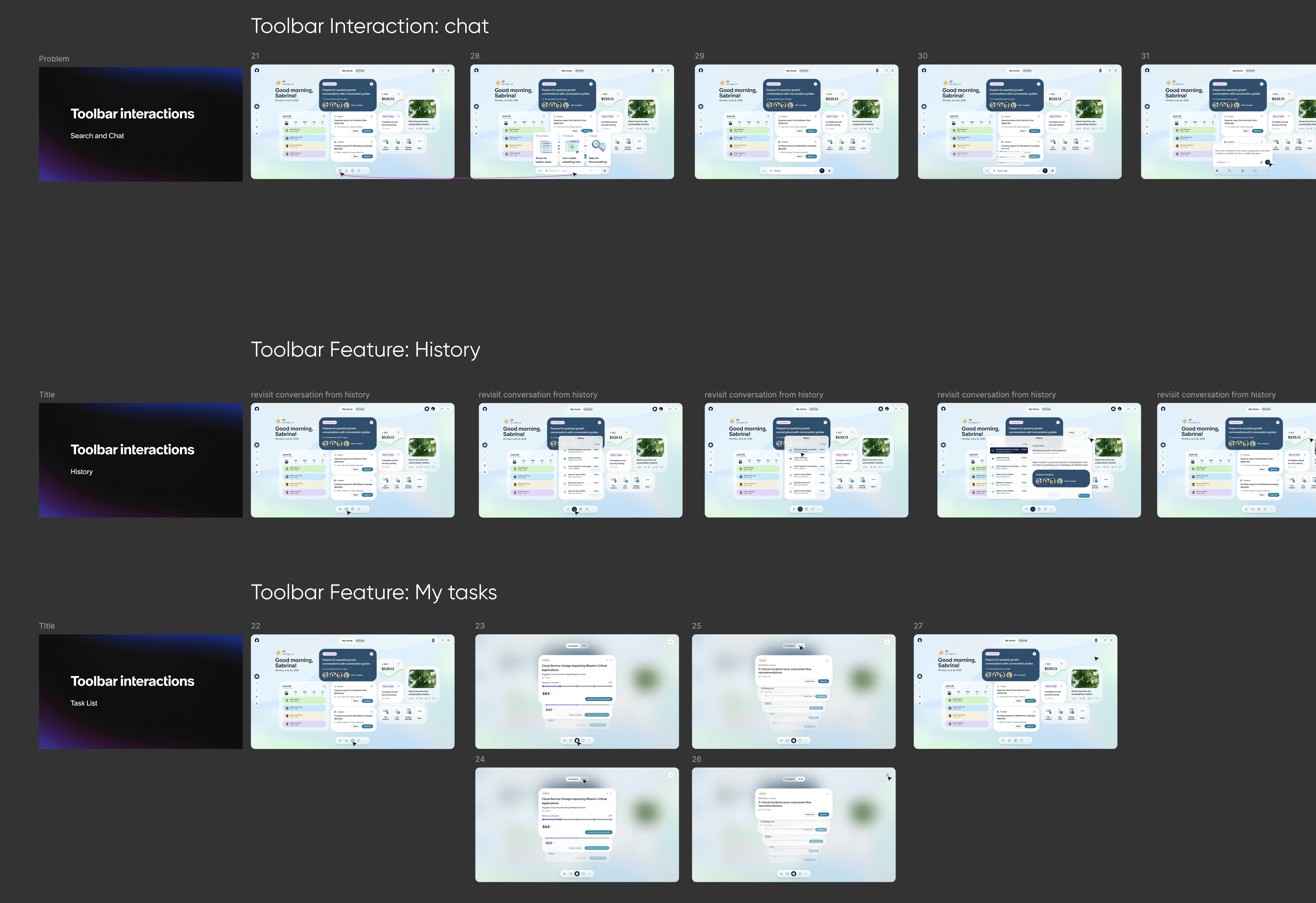
A major part of the work was deciding how chat should behave across the system. I designed sequences in Figma that showed multiple entry points into chat: user-initiated prompts, system alerts such as “AI has found something you should see,” and toolbar actions. I explored different form factors, including inline panels, draggable or pinned chat alongside a page, and full-page focused conversation views. I also mapped how chat connects back to the main UI: when it should remain a narrow side panel versus when it should expand to full page, how to preserve context using split layouts, and how to represent history and “work done by AI” so users could trust and review what happened. In parallel, I created a “toolbar interactions – employee experience” board that showed sequences for features like history, my tasks, and voice so stakeholders could see how the toolbar and chat worked as a system, not isolated widgets.Packaging for testing and leadership storytelling
Once the workspaces, navigation model, and chat patterns were solid enough for feedback, I packaged them into clickthrough flows and storyboard-style frames for Summer Strategy testing. These prototypes were used in customer sessions and internal walkthroughs to test reactions to AI-first workflows, layouts, and chat behavior. For leadership, I framed the work as a set of concrete scenarios that illustrated what an “AI OS” could be across roles and products, giving them something tangible to react to and prioritize against. After this round of testing and strategy discussions, I handed off the concept suite, IA patterns, and chat interaction boards to internal teams to refine and decide which elements to bring into product.
My Role
I served as the design lead for the AI-first workspaces and navigation vision. I translated prior AI patterns research into concrete interaction principles and used them as guardrails for all concepts. I designed the agent, manager, and admin workspaces, as well as Tasks and Search views, ensuring the visual and interaction language remained consistent across roles. I defined and documented the navigation and information architecture model, including the L1 rail, hubs, workspaces, page types, and create-new flows. I designed chat and toolbar interaction patterns across multiple entry points and form factors, and built storyboard flows showing how chat, navigation, and work surfaces come together in a single experience. Finally, I packaged everything into clickthrough prototypes and narrative boards for Summer Strategy testing and executive reviews, then handed off the vision and patterns for internal teams to refine and productize.
Impact
The work gave leadership and product teams a concrete, role-based vision of AI in the employee experience, moving the conversation from isolated features to an integrated “AI OS” story. It validated and refined our AI UX principles by exercising them in end-to-end flows instead of in isolated components. The concepts influenced subsequent pattern work on navigation, AI surfaces, and workspaces that individual product teams used as reference when designing their own experiences. Just as importantly, it provided a shared vocabulary and visual language for AI-first decisions, making roadmap and prioritization conversations more grounded and less abstract.